 Shackle
Free and open source
Two computers.
One screen.
Control another computer, or let someone you trust help with yours. No account, no time limits, no licence nagging.
Also for Windows, Mac (Apple chip) and Mac (Intel). Checksums
Read this before you install
Shackle is new. We would rather tell you its limits than have you find them.
- Whoever you let in has full control. They see your screen and can open your files, your email and your banking. Scammers use remote-control tools of every brand to steal money. Never give your ID and password to someone who contacted you first, whatever they say they are from.
- The installers are not code-signed. Windows shows "unknown publisher" and macOS blocks the first launch. That also means your computer cannot confirm the download came from us. Download only from this page and compare the file with the published checksums if you can.
- No independent security audit yet. The code has been reviewed and tested by its authors only. It is open source so anyone can inspect it.
- The connection server sees who connects to whom. Screen, keyboard and files travel encrypted between the two computers and are not readable by the server. The server does see IP addresses, IDs and connection times.
- A compromised server could attack the password check. If someone took over the server and intercepted a connection attempt, they could try to guess that session's password offline. Passwords are random and change after every session, which limits this, but it is not yet mathematically ruled out.
- Files you receive are not scanned. Treat a file sent through Shackle like any download.
- This is an early preview on a small free server. The first connection can take a minute, and on some mobile or company networks it will not connect at all.
What we do to reduce misuse: you approve every connection on screen, after the caller has already proven they know your password. A banner showing who is connected stays on top for the whole session. Passwords are single use. Settings that would let someone back in later are locked while anyone is connected. The app always shows its icon in the system tray while it is running. Full security notes
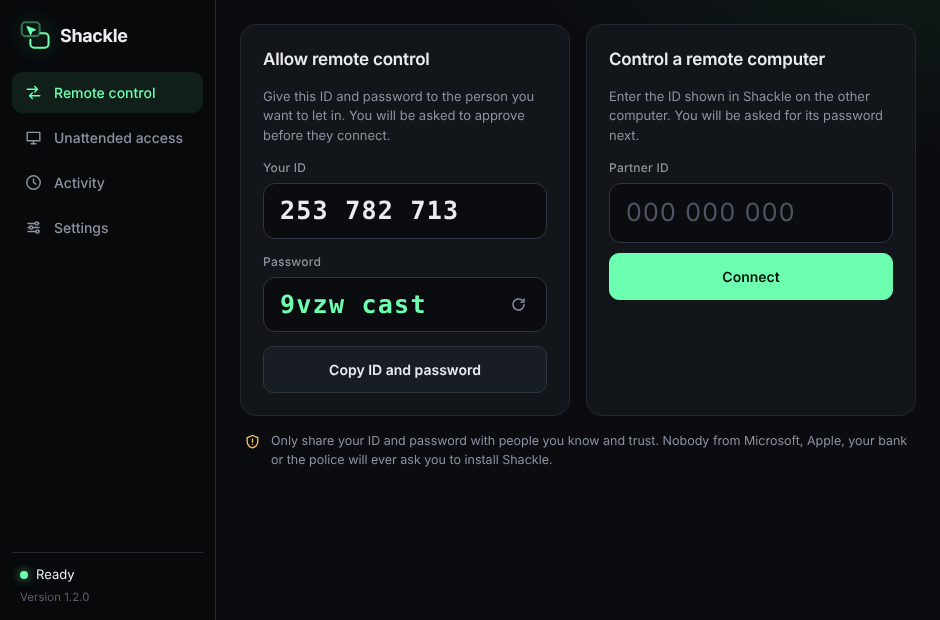
Both install Shackle
Open it. Each computer gets its own ID and a one-time password.
Share ID and password
The person being helped reads theirs out. The helper types them in.
Click Allow
Nothing happens until the person at the computer approves. They can end it at any moment.
Free, for any use
No account, no session limits, no "commercial use suspected" pop-ups.
Open source
MIT licensed. Read it, change it, or run your own server.
Direct and encrypted
The two computers talk to each other, not through us.